
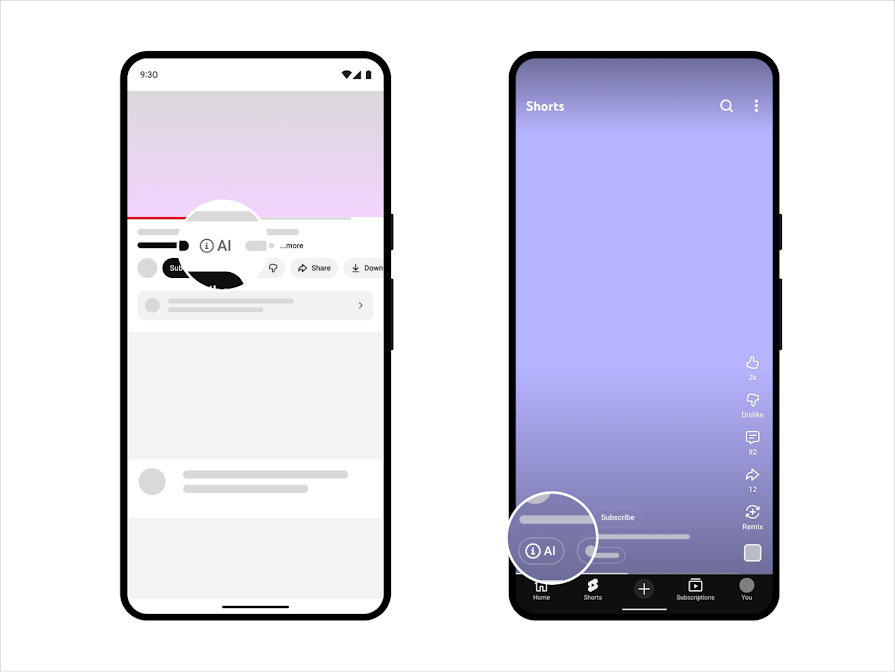
If your AI edit could make a normal viewer believe something real happened when it did not, YouTube wants disclosure. But that is not the same thing as saying AI content cannot make money. YouTube’s official help pages say disclosure itself does not limit audience reach or monetization eligibility.
For creators, the more important business question is whether the channel still feels original. A stylized AI workflow, original voiceover, or creator-led edit is different from a low-effort factory of near-identical uploads. The practical risk is not “AI exists.” The practical risk is content that starts to look repetitive, mass-produced, or inauthentic.
Short creator answer: YouTube is not saying “AI channels cannot monetize.” It is saying two separate things at once: realistic AI needs disclosure, and monetized channels still need to feel original rather than repetitive or mass-produced.
The short cheat sheet
This is the practical version of YouTube’s official language for AI video creators, editors, and social teams.
| Question | What YouTube says | What it means for creators |
|---|---|---|
| What triggers disclosure? | AI that meaningfully alters or generates photorealistic content, especially around real people, places, or events. | Disclose lip-sync, face swaps, fake testimony, fake event footage, realistic scene generation, and other edits that change what viewers think is true. |
| Where do viewers see it? | A label may appear in the player for photorealistic AI content, or in the expanded description for non-photorealistic or animated content. | Your audience may see the AI label directly on the video, not only in metadata nobody opens. |
| Can YouTube auto-label it? | Yes. YouTube says it may label content made with its own GenAI tools, uploads with C2PA metadata, or content detected by internal systems. | Do not build a workflow around “just not disclosing.” Provenance and platform detection are making that harder to hide. |
| What happens if I skip disclosure? | YouTube says repeated failure can trigger manual labels, content removal, or suspension from the YouTube Partner Program. | The risk is not only reputation. It can become a monetization and channel-health issue. |
| Can AI channels still monetize? | Yes, if the content still meets YouTube monetization policies: original, non-repetitious, properly licensed, and advertiser-friendly where required. | The bigger monetization threat is not “AI” by itself. It is a channel that looks automated, repetitive, low-value, or inauthentic at scale. |
Will YouTube kill AI content or demonetize AI channels?
This is the question creators actually ask, and the official answer is more nuanced than the panic posts suggest. YouTube does not say that using AI automatically blocks monetization. Its GenAI disclosure page explicitly says disclosure itself does not limit a video’s audience or monetization eligibility.
The stronger monetization filter appears in YouTube’s broader monetization policies. The platform says monetized content should be original and non-repetitious, and its 2025 clarification says repetitive or mass-produced content falls under its inauthentic content framing. That is the line creators should pay attention to.
Original creator-led AI work
Videos where the creator still adds original direction, commentary, scripting, editing choices, or a clear point of view can still fit monetization rules if rights and advertiser standards are handled properly.
Template-heavy AI channels
Channels full of near-identical shorts, repeated formats, mass-produced visuals, or low-effort voiceover swaps are more likely to raise the “inauthentic” or repetitive-content concern.
AI is not the whole test
The real review question is whether the channel still looks original, rights-cleared, and useful to viewers rather than machine-scaled filler.
That distinction also shows up in creator community questions. People are not only asking “Can I use AI?” They are asking whether their channel will be seen as repetitive content. That is the right fear to analyze, and it matches YouTube’s official monetization language better than the simpler “AI is banned” myth.
What counts as “meaningful” AI change on YouTube?
YouTube’s official help page gives three concrete examples of disclosure-worthy AI content: making a real person appear to say or do something they did not do, altering footage of a real event or place, and generating a realistic scene that did not actually occur. That is the cleanest way to interpret the policy.
For creators, the important distinction is not AI versus no AI. It is minor polish versus reality-changing transformation.
Minor enhancement
Light denoise, color cleanup, upscaling, or small cosmetic edits that do not change what happened in the scene.
Reality-changing AI
Face swaps, synthetic speech, scene generation, fake reactions, fake environments, or edits that make a real person or event appear different from reality.
Trust-sensitive content
News-like clips, political content, public figures, testimony, documentary framing, crisis footage, and anything presented as evidence.
Best creator-side test: ask whether a viewer could walk away with a false belief about who spoke, what happened, where it happened, or whether the camera captured a real moment. If yes, use the AI disclosure field in YouTube Studio.
Where the “Made with AI” label shows up
YouTube now separates the disclosure rule from the viewer-facing label experience. The disclosure can surface in two places: directly in the player for photorealistic AI content, or in the expanded description for other cases. That matters because creators can no longer assume disclosure stays hidden in the upload settings.
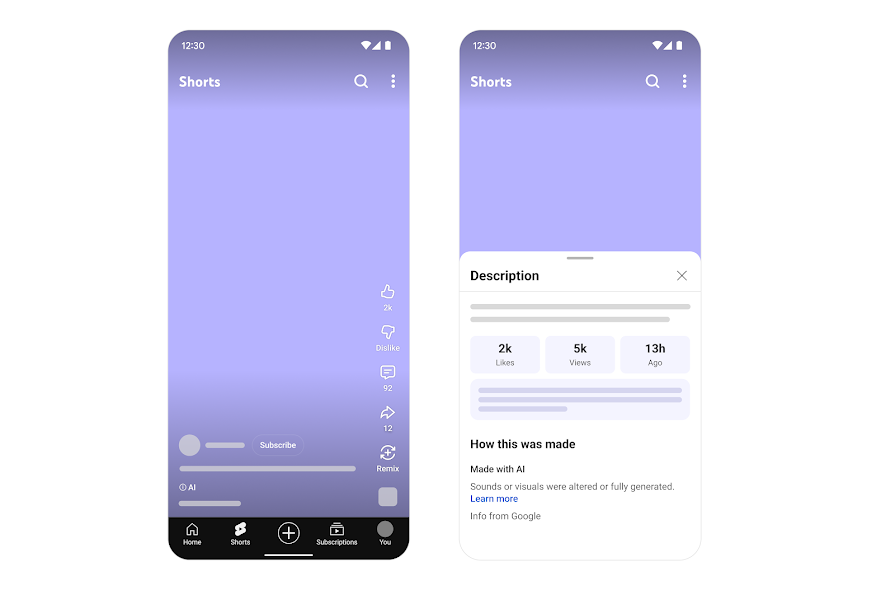
On YouTube’s companion help page about “How this content was made” disclosures, the platform explains that the disclosure can be carried into the detailed description when creators manually disclose AI use, when creators use YouTube’s own GenAI tools, or when valid Content Credentials data indicates the video was made with AI.
That means YouTube is building a more visible AI provenance layer. The label is no longer just a creator confession. It is part of how the platform explains the origin of content to viewers.
Why C2PA matters more than most creators think
YouTube explicitly mentions C2PA and secure Content Credentials as one of the inputs it can use to carry AI disclosures forward. If your editing or generation stack outputs provenance metadata, YouTube may use that information to apply the label.
For AI video creators, this changes the workflow in two ways:
- Disclosure is becoming metadata-aware. The platform does not need to rely only on manual honesty.
- The label can be sticky. YouTube says content made with its AI tools, content containing C2PA metadata, or content labeled after manual review cannot always be adjusted by the creator.
In practical terms: if you are using tools that generate provenance signals, assume those signals can travel with the file. Build for transparency instead of trying to strip context late in the pipeline.
What this means for AI content creators
Treat the YouTube Studio AI-use field like title, thumbnail, and description review. It belongs in the standard publish checklist.
Your team should know the difference between cleanup work and edits that change what viewers think happened.
Any clip involving public figures, product claims, documentary framing, or real-world evidence should get extra policy review before upload.
When a client asks what was generated or when a label appears unexpectedly, a simple record of synthetic shots saves time and arguments.
The AI label is moving toward routine platform hygiene, not a rare exception. Creators who adapt early will look more trustworthy, not less.
YouTube explicitly says disclosure itself does not limit audience reach or monetization eligibility. The bigger monetization risk is when a channel starts looking repetitive, mass-produced, or inauthentic.
What YouTube still can penalize
Disclosure is not a free pass. YouTube says its normal Community Guidelines still apply to AI-generated or AI-altered media. So a labeled video can still be removed if it violates the broader rules. Repeated failure to disclose can also lead to stronger action, including manual labels, takedowns, or suspension from YPP.
The key creator mindset shift: disclosure answers the transparency question. It does not solve every policy question. Harmful deception, impersonation, fraud, harassment, or unsafe content can still trigger enforcement even if the upload says it used AI.
A simple posting checklist for YouTube AI videos
- Ask whether the clip presents itself as real footage, real testimony, or a real event.
- Identify every shot that uses synthetic voice, lip-sync, scene generation, face swaps, or other meaning-changing AI edits.
- Check whether the export tool writes Content Credentials or related provenance metadata.
- Use the AI use field in YouTube Studio when the content meets the disclosure standard.
- Review the final upload as a viewer would: could someone misunderstand this clip without context?
- Keep a short internal note on what was generated or altered in case the platform or client asks later.
FAQ
Do I need to disclose every AI-assisted edit?
No. The official language is about realistic and meaningful change, not every tiny polish pass. The safest line is whether your edit changes what viewers believe happened.
Does disclosing AI use hurt monetization?
YouTube says disclosure itself does not limit audience reach or monetization eligibility. Hiding important AI edits is the bigger business risk.
Can an AI channel still make money on YouTube?
Yes, if the channel still meets YouTube monetization rules for originality, non-repetitious content, commercial-use rights, and advertiser-friendly standards. “Uses AI” is not the same thing as “ineligible.”
Can YouTube label my video even if I do not?
Yes. YouTube says it may use its own tool signals, C2PA metadata, or internal detection systems to apply the label.
What is the safest default for an AI video team?
If the edit changes the truth of who said what, what happened, or what the camera captured, disclose it during upload and treat that as standard workflow.
Bottom line
The most useful way to read YouTube’s AI policy is this: the platform is not saying “AI content is dead.” It is saying realistic AI needs disclosure, and monetized channels still need to look original rather than repetitive or machine-scaled.
The creators who handle this best will not be the ones who avoid AI. They will be the ones who disclose reality-changing edits clearly, keep rights clean, and make sure their channel still feels like real creative work instead of an automated content factory.
Official sources used in this guide
Disclosing use of GenAI content
Used for disclosure triggers, label placement, automatic labeling, monetization language, and non-disclosure penalties.
Understanding “How this content was made” disclosures on YouTube
Used for the “Made with AI” disclosure flow, description placement, and Content Credentials carry-forward details.
What kind of content can I monetize?
Used for YouTube’s originality, non-repetitious content, rights-clearance, and creator-made content guidance that matters for AI channels.
Referenced because YouTube explicitly names secure Content Credentials as one source for AI disclosure carry-forward.